Jump to Content
Home
Guides
API Reference
Theme Engine Reference
JavaScript SDK Reference
Recharge Help Center
Guides
API Reference
Theme Engine Reference
JavaScript SDK Reference
Recharge Help Center
Home
Guides
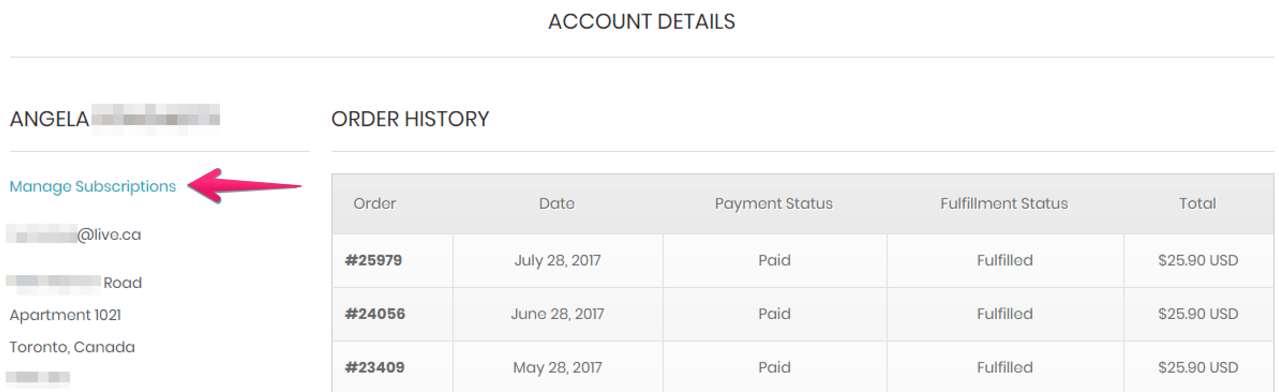
Adding the Manage Subscriptions link to the Shopify customer account on your storefront
All
Pages
Start typing to search…
Introduction
Understanding Recharge
Glossary of Recharge terms
Using the Recharge Checkout with BigCommerce
Partner Resources
Join the Recharge Tech Partner Program
Creating a partner app
Tech Partner FAQs
Curating the Bundles experience
Getting started with Bundles
Pre-filling the bundle widget using query parameters
Offering discounts for bundles
Customizing legacy Bundles widget layouts
Bundling widget events
Line item properties using bundles
Creating a dynamically-priced bundle using the API
Offering Tiered Discounts with a custom bundles widget
Bundles Widget 2.0
Using custom CSS and JavaScript for the Bundles 2.0 Widget
Customize bundle widget text using translation overrides
Custom Cart Enhancements
Adding an item to the cart with Ajax
Diagnosing issues with add-to-cart functionality
Redirecting directly to subscription checkout
Customizing the Subscription Widget
How to update the Subscription Widget using CSS
Open the “Learn More” popup in the Subscription Widget using JavaScript
Using quick view with the Subscription Widget
Using Quantity Upsells with custom widgets
Building a custom integration
Getting started with the Recharge API
Recharge API token
Middleware expectations in an ecommerce ecosystem
Backend data processing
Submitting an order to an external system
Refund and cancel orders
Add an automatic expiration to subscriptions
Updating cart attributes
Swap a subscription product
Setting up a quarterly subscription
Convert order injection errors to charge errors
Checkout
Recharge-hosted checkout
Self-hosted checkout
Third-party checkout
Setting up the auth/capture flow for orders
Customer portal
Build a Recharge-hosted customer portal
Use the Recharge API to build a custom customer portal
Custom customer portal tutorials
Using passwordless login for custom customer portals
Set up Recharge authentication for Shopify Customer Account UI extensions
Storefront
Accessing store information from Recharge's CDN on the front-end
Using platform data to store subscription information
Understanding common front-end functionality
Enhancing the customer experience
Affinity (Original next order page)
Understanding the Affinity customer portal
Affinity developer workflow
Customizing the Affinity customer portal
Leveraging events in Affinity
Personalizing the user journey in Affinity
Adding custom content to Affinity
Using advanced configuration options with Affinity
Using custom CSS in the Affinity customer portal
Preventing customers from canceling specific products in Affinity
Displaying the Bundles widget on the Affinity overview page
Affinity extension: Cancel subscription navigation
Affinity (Custom home page)
Leveraging events on the custom Affinity home page
Customizing the account access link
Managing the customer account access link
Personalizing the account access page using CSS
Adding CSS to the customer account access link
Managing the customer portal experience
Adding the Manage Subscriptions link to the Shopify customer account on your storefront
Embedding the customer portal within a store using an iFrame
Updating Custom Portals for Shopify Markets compatiblity
Offering a membership program
How-to create a Paid Membership Program using Recharge with Shopify Flow
Building custom customer experiences with the Theme Engine
Adding cursor pagination to Novum
Adding an Order Now button using the Recharge Theme Engine
Adding one-time products to existing subscriptions with the Recharge Theme Engine
Leveraging discounts
Getting started with discounts
Understanding discounts
Implementing commonly used discounts
Products and Subscriptions
Using Shopify Flow to identify subscription orders
Offering subscriptions for specific variants
Updating subscriptions in bulk using the Theme Engine
Gift subscriptions
Using Gift subscriptions with Shopify 1.0 themes
Custom coding the Gift subscriptions widget for Shopify 2.0 themes
Deprecation Notice: /products v.2021-01
Using the Recharge API
Recharge API values
Storefront API and JS SDK
Create an API request
Using cursor pagination with the Recharge API
API standards
API security
API rate limits
API versions
API resources
Addresses
Charges
Checkouts
Customers
Customer delivery schedule
Discounts
Metafields
One-times
Orders
Payments
Products
Subscriptions
Using webhooks
Full API reference
Async batches
Async batch tasks 2021-11
Async batch tasks 2021-01
Webhooks resources
Webhook examples 2021-01
Webhook examples 2021-11
Webhooks troubleshooting guide
Using the Legacy Javascript Widget
Legacy Javascript Widget
Adding CSS to the Legacy Javascript Widget in your Shopify theme
Customizing the Legacy Javascript Widget
Legacy Javascript Widget commands
Advanced widget commands for the Legacy Javascript Widget
Legacy Javascript Widget accessibility
Build a custom Legacy Javascript Widget compatible with Variant-Level Plans
Using Recharge with BigCommerce
Adding the customer portal link to your BigCommerce storefront
Adding the Recharge subscription widget to a BigCommerce theme
Understanding the BigCommerce cart page
Customizing the BigCommerce front-end with JavaScript
Available front-end objects for the Recharge Checkout on BigCommerce
Sending a product with a Text Modifier option to Checkout for the Recharge Checkout on BigCommerce
Customizing the subscription widget for BigCommerce stores
Creating an "Add-to-cart" button from a category page for the Recharge Checkout on BigCommerce
Customizing cart elements and the checkout for the Recharge Checkout on BigCommerce
Powered by
Loading
Loading…